Search This Blog

Thursday, July 28, 2016

How To Quickly Lock Keyboard And Mouse When Moving Away From Your PC

These Windows tools will help you to lock your keyboard and mouse quickly when you are not around the PC

There are several methods such as setting up a local or Microsoft account to be able to rapidly lock the PC by pressing Win + L and unlock it with a password to stop your inquisitive friends or co-workers from spying on your Windows computer when you’re not around. Another method is by opting for third-party tools to quickly lock and unlock the keyboard and mouse while keeping the screen’s contents visible.
In this article, we show how you can without any effort do this with KeyboardLock, Child Lock and BlueLife KeyFreeze that are free to use.

KeyboardLock

You do not require to install this app. All you need to do is double-click the .exe file from the downloaded package to launch KeyboardLock.
You have to enter a password to lock and unlock the keyboard and mouse. By default, the password is cake, but you can change it into anything of your choice. Click Start and just type the password to lock the PC, and type it again to unlock it. While the pointer can be moved in locked mode, but nothing occurs if you try to type something or click the mouse buttons.
Please note that KeyboardLock allows the Ctrl+Alt+Delete command to be activated, so someone can do this to access Task Manager and switch to open windows.

Child Lock

An icon in the systray is created by Child Lock at start-up, which has four buttons displayed in the main window. If you wish to automatically lock the application, click Auto Lock, if it hasn’t been active in the last 10 minutes. Double-click the tray icon of Child Lock and click Cancel in the main window, if you wish to cancel this task.
Click Lock to block the keyboard and mouse immediately or press Shift+Alt+End. While they are locked, any key press or mouse click will turn the mouse pointer into the prohibited sign.
Click Allow Only to allow only a few keys to be pressed: Space, PageUp and PageDown, or Click Block Win Ctrl to block only control keys, i.e. Ctrl, Alt and Win key. This mode starts a few seconds after clicking its button to give you time to choose a window to limit the buttons inside it. The mouse pointer cannot be moved in this mode.
Activate the Shift+Alt+Home key combination to unlock the keyboard and mouse. In the main app window, click Options to review the hotkeys for locking and unlocking, if you forget them. It’s not possible to change them.
Please note that Child Lock allows the Ctrl+Alt+Delete command to be activated (even if you trigger Block Win Ctrl), so someone can do this to access Task Manager and switch to open windows.

BlueLife KeyFreeze

Since BlueLife KeyFreeze isn’t enclosed in a setup kit, you can double-click the .exe file from the downloaded package to run the program. It gets integrated into the systray.
Right-click the tray icon to lock the keyboard and mouse, and choose Lock All Keys or press Ctrl + Alt + F. There’s a small interruption before locking, during which you can cancel the task.
You can lock only the keyboard or the mouse (right-click the tray icon and choose Lock Keyboard or Lock Mouse).

Press Ctrl + Alt + F to unlock the keyboard and mouse. If you want to make changes to this combination (Ctrl + Alt + any letter or number), right-click the tray icon, go to Options, click the menu next to Hotkey for lock/unlock: and select the preferred combo. You can also block mouse movement (clear the Allow mouse movement box) or Hide mouse pointer (tick this box). Once you’re done, click Apply Options to commit alterations.
After locking the devices with BlueLife KeyFreeze, if someone sends the Ctrl + Alt + Delete command, the computer gets locked instead.

Note: The apps mentioned above cannot stop anyone from pressing the power button on your computer to shut it down, thus losing any work that has not been saved, and switching it on again to gain access to your data unless Windows login is requested. Therefore, you should still create a local or Microsoft account to make sure that your PC is secure

Friday, June 17, 2016

How to Hack Someones Facebook Account Just by Knowing their Phone Numbers

Hacking Facebook account is one of the major queries on the Internet today. It's hard to find — how to hack Facebook account, but researchers have just proven by taking control of a Facebook account with only the target's phone number and some hacking skills.

Yes, your Facebook account can be hacked, no matter how strong your password is or how much extra security measures you have taken. No joke!

Hackers with skills to exploit the SS7 network can hack your Facebook account. All they need is your phone number.

The weaknesses in the part of global telecom network SS7 not only let hackers and spy agencies listen to personal phone calls and intercept SMSes on a potentially massive scale but also let them hijack social media accounts to which you have provided your phone number.

SS7 or Signalling System Number 7 is a telephony signaling protocol that is being used by more than 800 telecommunication operators worldwide to exchange information with one another, cross-carrier billing, enabling roaming, and other features.

However, an issue with the SS7 network is that it trusts text messages sent over it regardless of their origin. So, malicious hackers could trick SS7 into diverting text messages as well as calls to their own devices.

All they need is the target’s phone number and some details of the target’s device to initiate the silent snooping.

The researchers from Positive Technologies, who recently showed how they could hijack WhatsApp and Telegram accounts, now gave the demonstration of the Facebook hack using similar tricks, Forbes reported.

SS7 has long been known to be vulnerable, despite the most advanced encryption used by cellular networks. The designing flaws in SS7 have been in circulation since 2014 when the team of researchers at German Security Research Labs alerted the world to it.

Here’s How to Hack Any Facebook Account:


The attacker first needs to click on the "Forgot account?" link on the Facebook.com homepage. Now, when asked for a phone number or email address linked to the target account, the hacker needs to provide the legitimate phone number.

The attacker then diverts the SMS containing a one-time passcode (OTP) to their own computer or phone, and can login to the target’s Facebook account.

Saturday, May 16, 2015

Fix Hard Disk Error "Too many Bad Sectors" yourself.

Hello Everybody,
This is a new Tutorial on how to fix your hard disk when it is crashed due to too many bad sectors. I was once the victim of this error and i thought i lost all my data as well as hard disk and was afraid to buy a new hard disk which would cost me about $ 65 for 1TB hard disk (internal) i went though many searches in google and finally i got a software named HDD regeneration which helped me not only repairing the disk but also recovered my data. I think you should also give a try to this software and become happy getting your data as well as HDD back to its original state.

Here is a little bit information about the HDD Regeneration tool:

  • HDD Regenerator is a tool that lets you scan your system and both locate and reconstruct bad sectors on your hard drive.
Your PC's hard drive is one of the most integral components of your computer. It stores all of your information and keeps it safe. So what happens if it's no longer working properly?
Time to look for a program that repairs hard drives. That's where HDD Regenerator can come in handy. This useful tool helps scan your hard drive's disk surface in order to detect bad sectors which are making the information on your hard drive unreadable. In the event you do have bad sectors, it could be impossible to retrieve information you've stored on your hard drive, as well as copy it elsewhere. Ultimately, your computer might not even boot up properly.
HDD Regenerator can help reverse some of the effects of bad sectors on your hard drive. In some instances, it can repair problem areas so you can continue running your computer in a best case scenario. In other instances, HDD Regenerator at least gives you the opportunity to retrieve important information before you need to replace your hard drive altogether.
HDD Regenerator is useful because it supports many different types of hard drives. The developers claim that it can repair approvimately 60% of hard drives. While not a great percentage, it's far better than not having any option available to you at all. The only critique is that HDD Regenerator might be a little confusing to run for beginning users.

If you need a way to attempt to retrieve data or repair bad sectors on your hard drive, give HDD Regenerator a try.

Notes

Since the program does not change the logical structure of a hard drive, the file system may still show some sectors marked earlier as "bad" and other disk utilities such as Scandisk will detect logical bad sectors even though the disk has been successfully regenerated and is no longer damaged by physical bad sectors. If you want to remove these marks, repartition the hard disk drive. Also it may take as much as 4-5 hours for 500GB hard disk to regenerate or repair the errors depending on the sectors damaged so be patience until it finishes its work.


Pros
  • Works on several different types of hard drives.
  • Does not affect existing information on your hard drive.
  • Repairs damage which low-level disk formatting cannot.
Cons
  • Not always effective
 
click here to get the software with patch.
like and message us in our facebook page to get the password for the zip file.

Sunday, September 8, 2013

Pattern Unlock Too Many Attempts (Android) – How to Fix

If you have forgotten the pattern lock on your Android device (tablet or smart phone), and if you are trying too many patterns for unlocking your device, remember that you are not the only one. Many other Android users also have faced the same situation. At one stage, it will ask you to login with your Google Account. Few users could successfully enter their phone by giving the details of their Google Account. But according to many users, nothing will happen even when you have login with your Google Account.


Although there are huge number of solutions for this problem on the net, none of them seemed to work for all users. Few people are suggesting to go for factory reset when they are not getting good results with any of the available methods of unlocking the pattern.
For factory resetting your Android device, turn off the device (phone or tablet). Now, turn it on by holding the ‘Home screen’, ‘Power screen’ and ‘Volume Up’ button simultaneously. This will cause the phone to show up ‘System Recover’ screen. Scroll down the phone until you find the option for ‘Factory reset’. It will ask you for confirmation whether you really want to factory reset your device. Once you have given confirmation, it will inform that all the data present in the device would get deleted. After you tap the option ‘Yes’, your phone will get factory reset. Now, it will not have any pattern lock and hence it can get open now.

Note: Factory resetting your device (tablet or smart phone) will cause you to lose all your personal data in the device. That means, the messages, photos, accounts, videos, data stored on internet memory and other data might be lost in the process. So it is better to go for factory reset only as a last resort, and only when you don’t have any important data in your phone.

Sunday, August 18, 2013

Activate Windows Using Commands. No Software Nothing Needed!!

Activate windows without any software. Works with most of the Windows 8 OS, any version try it.

Open notepad and paste the following code

slmgr /upk
slmgr /ipk NG4HW-VH26C-733KW-K6F98-J8CK4
slmgr /skms lunar21.no-ip.org:80
slmgr.vbs -ato


Save the file as Something.bat and run it as an admin
Restart your PC.
Thats all and you are done.

Netcut for cutting net for others

Hey friends today i have come up with a new post different from the previous ones.
This post is for you all, Its not so complicated just what you have to do install the provided software and enjoy internet alone such that no one in your network will get internet access even if they know your WiFi password.
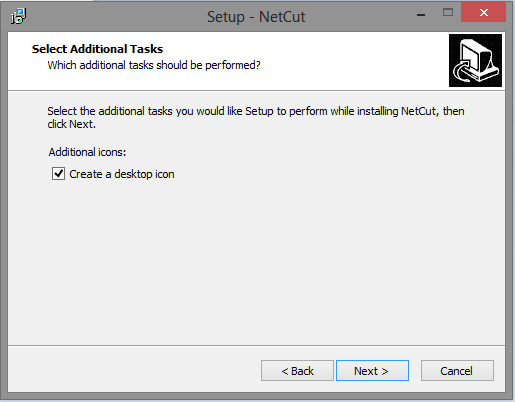
Here is the step-by-step process of installing the software.
The link to the software is here .
<<<<<<<<<<<<<<<<<<<<<<<<<<<<Download Netcut Here>>>>>>>>>>>>>>>>>>>>>>>>>>

Screenshots>>>>>

Double click on the netcut.exe file
and complete the installation process.


Click Next
Click Next
Click Next

Click Next
Click On Install
Here the software installation process starts. wait until it finishes
After installation it will ask as this
If it asks like this click on the option "Run the program without getting help"
(This is often asked if you are using windows 7 or higher to check the compatibility issue)
Click on Next
 Click on Next

 Click On "I Agree"

 Click on Install
(Here you can choose whether you want to start the application driver at boot time or not, if not uncheck the option provided)

It Automatically installs all the components required by the software. Be patience until the installation finishes.


Click on Finish

 Here if you are Busy with other work you can reboot the system afterword by checking the option "No, I will restart the computer later", Otherwise if you want to reboot check the first option and click Finish, to complete installation.


Now after Reboot you can see the netcut icon in your desktop and you are now able to run this software.
Right Click on the netcut shortcut icon and run it as an administrator as given in the below picture.

I have mentioned how to use netcut in the picture below. Have a look Over it.


If you have any comment please don't hesitate to post.


Friday, August 2, 2013

How You Can Protect Yourself from Facebook Hacking.

It seems there is never a shortage of new hacks, new viruses, and the like. Most of them can be treated as “noise”, or just watched to see how they go, relying on our set of security tools. But other times, some come to my attention and warrant some action.
 Now, I’ve got someone trying to get into my Facebook account.
Did you know several readily available applications can capture Facebook traffic on both wired and wireless networks? It’s trivial to download one of these applications and just start harvesting logon credentials whenever anyone fires up Facebook. Once captured, these can be used to log into the account as the owner.
Here’s How You Can Protect Yourself from Facebook Hacking.
It is as simple as using the Facebook Connection Security Configuration.
{I am not a security expert, but these configurations have helped me.}


1. Configure Facebook settings to use HTTPS for all interactions.
Click the drop down arrow beside home >Account Settings > Security


2.  Click the edit link on the secure browsing line,


Then check the box to browse on Facebook on a secure connection when possible and save changes.


3. Under the secure browsing, edit the login notifications. I have an email sent to me when my account is accessed from a computer or mobile device I haven’t used before. 
4. For a higher level of security (with some added complication), you might consider using Login Approvals and selecting “Require me to enter a security code sent to my phone (when an unrecognized computer or device tries to access my account)”.


5. You may also choose to have an app password added to your account to protect yourself from hacking through apps.

Beside this this tips you can also add different security measures to help yourself from being hacked. The top 3 reason or method that a hacker use to hack your facebook account are as follows:

1. Phising: It is a technique of sending the fake link that consists of cloned facebook homepage, and there you are asked to enter your username and password which then redirects you to your facebook account. You will never notice that you have provided the username and password to phishing page.
>>Preventive Measure: Make sure you see the link of the page before you click it. Mostly Phishing pages are shorten pages like adfly.com or like that. If accidentally  you happen to click the link then don't panic. Be alert dont provide your facebook id and password to other than facebook.com.


2. Security Question: Donot ever reveal your security answer to any of your friends or colleagues. Sometime it may lead them to hack your account 'Just for Fun'. Set the security question that is simple , Easy to remember and difficult to guess. Like if the security question is : Where was your mother born? then the answer shouldnot be the place where you mom was actually born but a different place name which is simple or easy to remember to you and difficult for others to guess.

3. Trusted three Friends: This method is implemented by hackers nowadays because phishing is known to almost all the facebook user and are aware of it. This method asks for trusted 3 friends whom the code is sent for password reset.
>>To avoid the hacker use this method for their benefit then you have to be alert and donot accept the friendship request from unknown facebook accounts.

Other than these there are many methods such as tabnapping, using social engg. tools etc. but we all have to be
A. Alert while opening the facebook account,
B. Manage it once in a week or month,
C. Donot click on the link that is provided,
D. Activate Mobile verification code if possible
E. and last but not least regularly change your facebook password once a month.
Also donot keep your facebook id password and mail address password the same, and donot give anyone your mail address.


Be safe! Be Happy!!